

Blog
Stop Scrubbing Timelines: The New GW42-4208P-3 Searches Your Footage Like You Search the Web
Oct
A package was on your porch Tuesday afternoon. By Tuesday evening it wasn’t. You have eight cameras and days of footage, so you absolutely have the answer — somewhere in roughly four hundred camera-hours of video. And that’s when you discover the dirty secret of home security: recording was never the hard part. Finding the moment is.
So you do what everyone does. You guess a window, scrub the timeline at 16× speed, squint at a fast-forwarded porch while your coffee goes cold, check the motion-event list, and find nine hundred entries that are mostly tree shadows. Forty minutes later you’re not sure if you missed it or it hasn’t happened yet on the timeline.
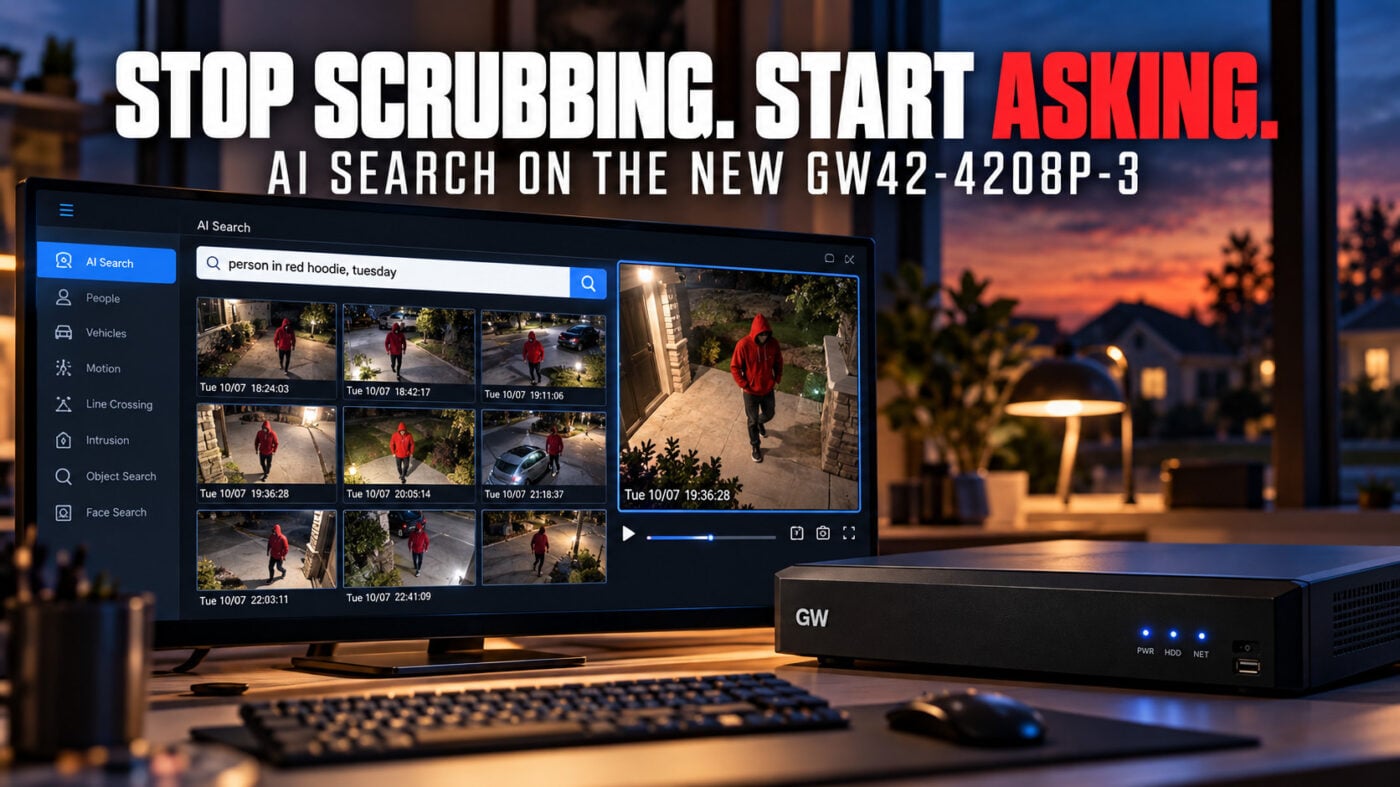
Our new GW42-4208P-3 NVR retires that entire ritual. You type what you remember, the way you’d remember it — “person with a backpack on the porch Tuesday afternoon” — and the recorder hands you the clips. Searching your own footage finally works like searching the web, and it changes what owning cameras actually feels like. Here’s how it works, what it can and can’t do, and why we built it to run entirely on the box in your closet.
How plain-English search actually works
The trick isn’t that the NVR understands you — it’s that it took notes the whole time. As the GW42-4208P-3 records, its onboard AI continuously indexes what the cameras see: people and vehicles, their colors and attributes, where they appeared, which direction they moved, and when. None of that waits for you to ask — by the time you need something, the index already exists, which is why results come back in seconds instead of requiring a re-scan of days of video.
Your search — typed or spoken into the free mobile app, or run from the NVR directly — gets translated into that index. “Red hoodie” becomes a person-with-red-upper-clothing attribute. “Tuesday afternoon” becomes a time range. “Near the garage” becomes two specific cameras. The recorder intersects them and returns a row of thumbnails. Tap one, and you’re watching the moment — full resolution, main stream, export-ready for a police report or an insurance claim.
People
Who was here?
“Person in a red hoodie after dark” · “someone with a backpack at the front door this week” · “adult near the side gate Saturday”
Vehicles
What drove up?
“White pickup in the driveway after 10pm” · “any vehicle that stopped out front yesterday” · “the car that was here around noon”
Moments
When did it happen?
“Everyone on the porch Tuesday 2–6pm” · “last person near the car before this morning” · “when the contractor arrived and left”
The scenarios write themselves because they’re your actual life: the package that vanished Tuesday. The new scrape on the car door — “who was near the driveway side of the car since yesterday?” The invoice that bills eight hours — “when did the work van arrive and leave?” The after-school check that’s suddenly one search instead of four camera timelines.
Why it runs on the box — not in someone’s cloud
Every big-brand consumer camera company offers some version of smart search. Almost all of them do it by uploading your footage to their servers and charging you rent to visit it. We’ve written before about what that costs over five years and what happens to it when the cloud has a bad day. The GW42-4208P-3 takes the other road: the AI indexing and the search both run on the NVR itself. That buys you four things, and they’re not small:
- Privacy by architecture. Your footage never leaves your house to be searchable. There is no server-side copy of your family’s comings and goings, because there is no server.
- $0/month, forever. The intelligence is in the hardware you bought. No analytics tier, no “premium search” upsell, no feature that stops working when a subscription lapses.
- Speed. Searches run over a local index on a local network. No upload queue, no cloud round-trip — results in seconds, even across all eight channels at once.
- It works when the internet doesn’t. An outage kills remote viewing until service returns — but recording, indexing, and on-site search never blink.
The hardware under the search bar
The search feature rides on what was already our favorite 8-channel platform — the P-2’s workhorse bones with a third-generation AI engine doing the indexing:
| Channels | 8 IP channels, cameras up to 12MP, with 8 built-in PoE ports — one cable per camera, as covered in our PoE guide |
| AI, on-device | Plain-English search plus person/vehicle detection, face detection, and smart motion — all processed on the NVR, no cloud dependency |
| Compression | Ultra 265 / H.265 / H.264 — the codec math from our compression guide applies in full |
| Storage | Dual SATA bays, up to 20TB total — size it with the storage guide |
| Output & access | 4K HDMI + VGA out, free mobile app with remote search — and no monthly fee on any of it |
What search can’t fix (and what it quietly depends on)
We’d rather tell you this than have you discover it: natural-language search finds moments in your footage — it cannot find detail your cameras never captured. Everything this series has covered still decides what the search results are worth. If the porch camera renders faces as backlit silhouettes, search will dutifully find you a silhouette in a red hoodie. If the subject was forty pixels tall, or the night image is gray fog, or a starved bitrate turned the mover into blocks, the AI is indexing mush. Great search is the last link in a chain — placement, light, lens, and bitrate are still the first four.
- “AI search means my footage goes to the cloud.” Not here. On the GW42-4208P-3 the index and the search run on the recorder. Cloud-free is the point.
- “It replaces alerts.” Different jobs. Alerts are for now (someone’s at the gate); search is for after (who was at the gate this week). You want both tuned, not one pretending to be the other.
- “It’ll find anything.” It finds what was visibly captured. A camera that couldn’t identify someone at 60 feet still can’t — search just gets you to that disappointing clip faster. Fix the camera, then the search gets scary-good.
- “All ‘AI NVRs’ do this.” Most “AI” on spec sheets means motion classification, not language search. If the brochure doesn’t show a search bar accepting a sentence, it doesn’t have one.
Questions to ask about any search-enabled NVR
Shopping this feature anywhere — including with us — these five questions sort the real thing from the rebranded event filter:
- Where does the processing run? “On the NVR” is the answer that protects your privacy and your wallet. “In our cloud” means your footage travels and usually means a fee.
- Is there a monthly cost — now or later? Ask specifically whether search stays functional with zero active subscriptions.
- What attributes are searchable? People and vehicles with colors, clothing, and time ranges is the useful baseline. “Motion events” alone is the old world with new paint.
- What happens with third-party cameras? Honest vendors distinguish full-metadata support (their cameras) from basic support (ONVIF). Silence here usually means “it breaks.”
- Can results be exported? A found clip you can’t hand to police or insurance in a standard format is a demo, not a feature.
The bottom line
For fifteen years, security footage has been something you have but rarely use — because using it cost an evening. Plain-English search on the GW42-4208P-3 collapses that cost to a sentence. The question stops being “is it on camera?” (it almost always was) and becomes “what do I want to know?” — which is what you thought you were buying the day you put up cameras in the first place.
Want to see your own use case before you buy?
Tell our U.S.-based team how many cameras you run and what you’d search for — we’ll walk you through what the GW42-4208P-3 would do with your exact setup. Real phone calls, no wait tree.
Building a system around the new recorder?
The GW42-4208P-3 plus the AI cameras that feed its search — matched to your property in six questions. 60 seconds, no email required.
