Blog
PoE vs WiFi Security Cameras: Why Professional Installs Almost Always Pick One
Jun
Walk into any big-box store and the security camera shelf is almost entirely WiFi cameras. Walk into a commercial installer’s truck and you’ll see almost entirely PoE cameras. That’s not a coincidence — it’s the gap between what’s easy to sell to consumers and what professionals actually deploy when reliability matters.
This post walks through the real differences between PoE and WiFi cameras, the failure modes the marketing doesn’t mention, and which one is the right call for where you’re trying to put the camera. Spoiler: there are good reasons to pick either — but only one of them is actually about the technology.
The one-sentence difference
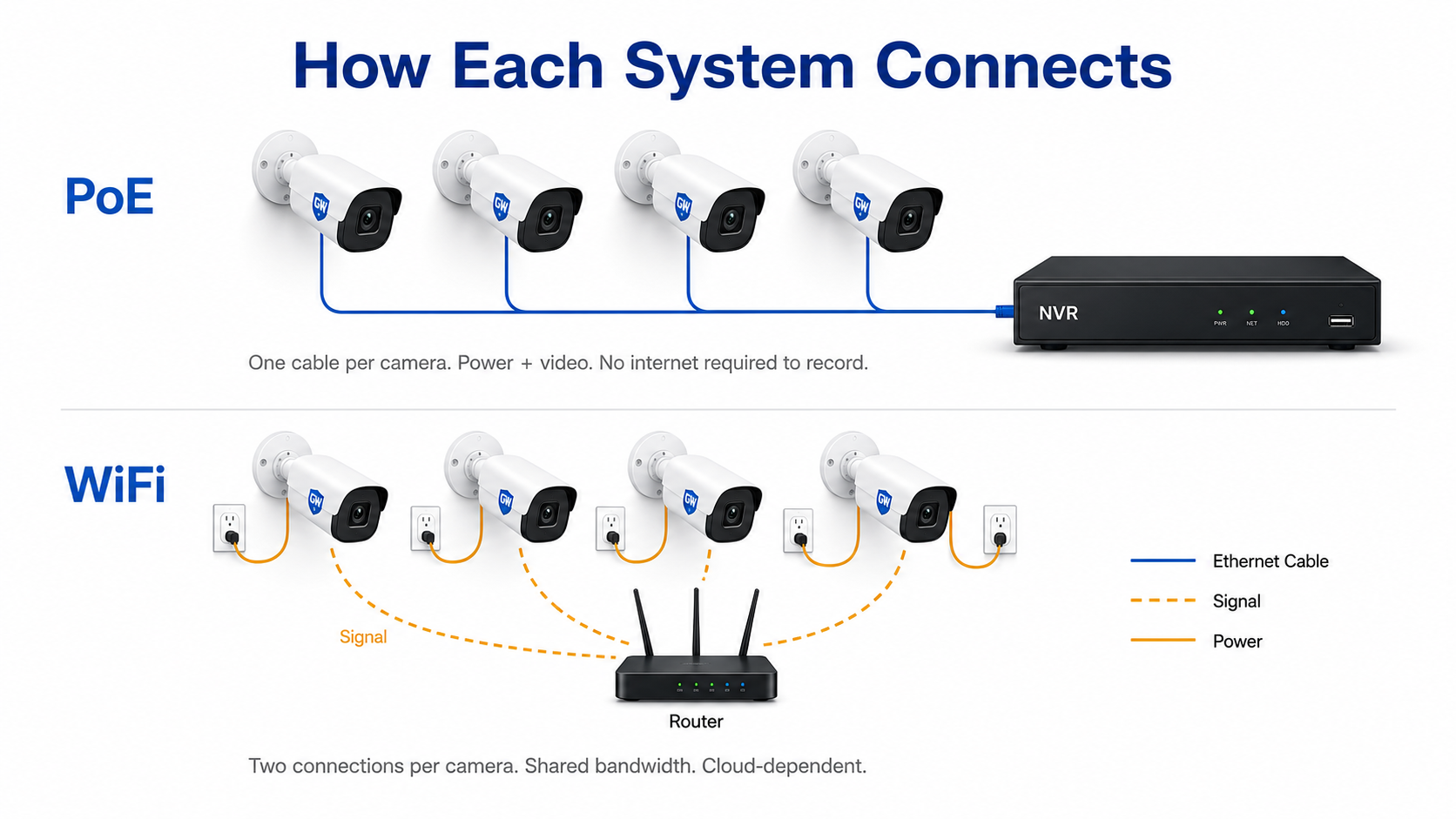
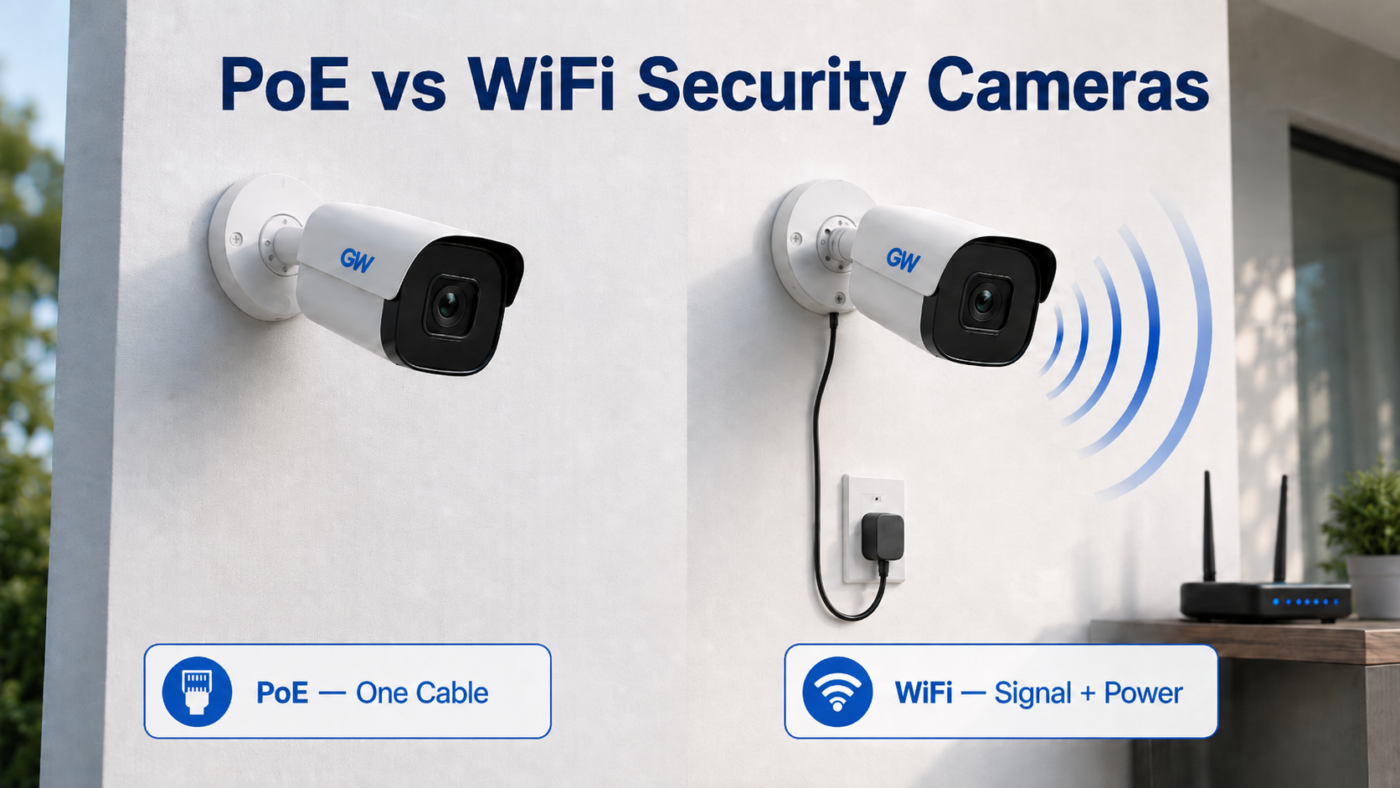
A PoE camera gets both its power and its data over a single Ethernet cable that runs back to a switch or NVR. A WiFi camera needs a separate power source at the camera (usually a wall adapter) and sends its video stream over your home or business WiFi network.
Wired
PoE (Power over Ethernet)
One Cat5e/Cat6 cable carries power and video back to the NVR. Up to 328 feet per camera. Records locally regardless of internet status.
Wireless
WiFi
Camera is powered by a nearby wall outlet. Video streams over your existing wireless network. Easy to install, harder to keep working.
That difference — one cable vs no cable — sounds like a wash on paper. In practice, it determines how the camera behaves when things go wrong, and things always eventually go wrong.
What the WiFi sticker doesn’t tell you
WiFi cameras get sold on installation simplicity: no drilling, no cable runs, mount it and pair it through an app. That part is true. What’s left off the box is everything that has to keep working after the install is done.
Range is shorter than you think
A typical 2.4GHz consumer WiFi camera has a practical range of 30–50 feet through interior walls, and that’s optimistic. Exterior walls with insulation, brick, or stucco cut it further. A camera at the far corner of a detached garage or back fence is often outside reliable range even when one bar still shows on the signal meter — and “one bar” is exactly where dropped packets, freeze-frames, and unrecoverable disconnects start.
The 2.4GHz band is a parking lot at rush hour
Almost all consumer WiFi cameras use the 2.4GHz band because it has better range than 5GHz. That band is also shared with every other WiFi device, every microwave oven, every Bluetooth device, every cordless phone, every baby monitor, and every neighboring router for hundreds of feet around you. Congestion gets worse every year, not better.
The symptom homeowners notice: cameras that worked fine the first month start dropping clips, missing motion events, or going offline for hours at a time. The cause is almost never the camera — it’s the band underneath it.
Bandwidth math doesn’t scale
One 4K WiFi camera streaming at 8 Mbps is fine. Four of them streaming simultaneously is 32 Mbps of sustained wireless traffic on top of whatever else your network is doing — and most consumer routers cap out long before that under real-world conditions.
is roughly where consumer routers start dropping frames on a typical home network. Past that, dedicated infrastructure isn’t optional.
Security has been a recurring problem
WiFi cameras have been hit by some of the worst breaches in the consumer IoT space — entire fleets of cameras from major brands accessed by strangers over the internet, footage indexed and searchable on shady sites, default-password compromises at scale. The cameras themselves aren’t fundamentally insecure; the WiFi-plus-cloud architecture creates a much larger attack surface than a self-contained PoE system that never touches the public internet.
The cable problem doesn’t actually go away
This is the one that surprises people: WiFi cameras still need power. That means there’s still a wire running from the camera to a nearby outlet. If you have to run a wire anyway, “wireless” is mostly a marketing word — you’ve traded a single Ethernet run that goes to your NVR for a power run that goes to the wall, and now your video is at the mercy of the WiFi network instead of being on its own dedicated wire.
Why professional installs are almost always PoE
PoE solves all four of the problems above in one move, which is why it’s the default for any installation that has to actually keep working for years.
Range that actually matches the spec
A standard Cat5e or Cat6 cable carries PoE up to 328 feet (100 meters) per run, full bandwidth the whole way. There’s no signal degradation, no congestion, no interference. A camera at the back of a long driveway gets the same video quality as a camera at the front door.
Dedicated bandwidth per camera
Every PoE camera has its own physical wire back to the NVR’s PoE switch. There’s no shared band, no contention. Sixteen 4K cameras on a 16-port PoE NVR all stream at full bitrate simultaneously without negotiating for airtime, because there is no airtime — there’s just copper.
Local recording that doesn’t care if the internet is down
Because a PoE camera records to a local NVR instead of streaming to the cloud, it keeps recording when your internet goes out, when your ISP has a regional outage, when the cloud provider has an outage, and when the power blip resets your router. The NVR runs on a UPS for a few extra dollars and you have continuity even through brief power events. None of that is true of a WiFi-plus-cloud setup.
The system is air-gapped from the public internet by default
A PoE NVR doesn’t need an internet connection to function. You can give it one for remote viewing on your phone — and we recommend you do — but the cameras themselves communicate only with the NVR on a private wire, not with any third-party server. There’s no “cloud account” that can be breached because there’s no cloud account.
When WiFi is honestly the right call
WiFi cameras aren’t a bad technology — they’re a different tool. There are scenarios where they’re the correct answer:
- Renters who can’t run cable. If your lease prohibits drilling through walls, a battery-or-plug-in WiFi camera might be the only option.
- Indoor-only, short-term, single-camera setups. A nanny cam, a quick check on a vacation rental, a single doorbell camera at an apartment. One camera, close to the router, low stakes.
- Locations where running cable is genuinely infeasible. A detached structure across a yard, a temporary construction site, a monitoring point you’ll move next month.
- Battery-powered cameras for off-grid spots. Solar-charged battery cameras can monitor a remote barn, gate, or vacation property where there’s no power. These almost always use cellular or WiFi for connectivity because they have to.
The honest test: is this camera going to be running 24/7 for the next five years on infrastructure I control? If yes, PoE. If no, WiFi might be the better fit despite its tradeoffs.
Side-by-side spec comparison
| Spec | PoE | WiFi |
|---|---|---|
| Max cable / signal distance | 328 ft per camera, no degradation | 30–50 ft through walls, signal-dependent |
| Power source | Same Ethernet cable as data | Separate wall outlet or battery |
| Bandwidth per camera | Dedicated 100 Mbps / 1 Gbps wire | Shared with all other WiFi devices |
| Recording during internet outage | Continues recording locally | Cloud-dependent cameras stop; some have SD-card fallback |
| Network attack surface | Private wire to NVR; no internet exposure required | On your WiFi; often paired with cloud account |
| Install time per camera | 30–90 min (cable pull + termination) | 10–20 min (mount + WiFi pair) |
| Long-term reliability | Years without intervention | Degrades as WiFi environment gets more crowded |
| Best for | Permanent multi-camera installations on owned property | Single cameras, rentals, temporary setups, off-grid |
What to do if you’ve already got WiFi cameras
If you bought a WiFi camera setup and it’s working fine, there’s no urgency to rip it out. The cases where WiFi failures actually cost people footage are usually one of two situations: (1) expanding past 3–4 cameras on the same network, where congestion compounds, or (2) outdoor or long-range mounts where the signal was marginal from day one.
If either of those describes you, the upgrade path isn’t another WiFi camera — it’s a PoE NVR with a few wired cameras handling the critical angles, and your existing WiFi cameras kept for the easy spots they already cover. PoE and WiFi cameras can coexist on the same property; they don’t have to share infrastructure.
How to read a camera spec sheet for connectivity
When you’re comparing cameras, the connectivity specs that actually matter:
- Wired vs wireless — listed clearly on any reputable spec sheet. If a camera is labeled “wireless” but also requires a power adapter, it’s WiFi-plus-power, not truly wireless.
- PoE standard supported — 802.3af, 802.3at (PoE+), or 802.3bt (PoE++). Make sure it matches what your NVR or PoE switch supplies.
- Maximum cable length — usually 328 ft for standard PoE. Some brands offer 800 ft+ “long-range PoE” extenders if you need more.
- WiFi band(s) — 2.4GHz only, or dual-band 2.4/5GHz. Dual-band is more flexible; 5GHz has shorter range but less congestion.
- Local recording option — SD card slot or local NVR support. A WiFi camera with no local fallback is entirely cloud-dependent, which is its own risk.
- ONVIF compliance — the open standard that lets cameras from different brands work together. Without ONVIF, you’re locked into one vendor’s NVR.
If a manufacturer’s spec sheet doesn’t list the PoE standard, doesn’t mention cable length, or treats “wireless” as a feature without explaining what’s on the other end of the wireless link — that’s the same flag pattern you see anywhere else in this category. The spec sheets that don’t say much are usually the ones with the least to brag about.
Browse PoE security cameras
Every GW Security PoE camera lists its PoE standard, maximum cable run, codec, and bitrate in full. No mystery numbers — just the spec sheet you’d want to compare against any other brand.
Not sure which setup fits your property?
Our Help Me Choose tool asks six quick questions about your property and recommends a complete pre-configured PoE NVR system — cameras, switch ports, and cable runs already matched. About 60 seconds. No email signup required.